
A Developer’s Guide to SEO Tools and Data Analytics
Stop treating SEO like a marketing dark art.
It’s a data problem.
If you’re a developer, you already have the mental models needed to crush search rankings. You just need the right telemetry.
Most marketing-led SEO advice is fluff.
It focuses on “keyword density” and other outdated metrics that Google’s transformer-based models (like BERT and MUM) largely ignore now.
Data without context is just noise. Most “SEO experts” stare at a single “Authority Score” and call it a day.
That’s a mistake.
We need to look at crawl budgets, indexation latency, and server-side log files.
If you aren’t looking at the underlying infrastructure of how search engines consume your site, you aren’t doing technical SEO. You’re just guessing.
Let’s break down the stack.
We’ll look at the SEO tools that actually move the needle and how to build a custom analytics pipeline that doesn’t suck.
We are going deep into the APIs, the data schemas, and the automation scripts that separate the amateurs from the pros.
The Foundation: Google Search Console (GSC)
It’s the only place where Google talks back to you directly.
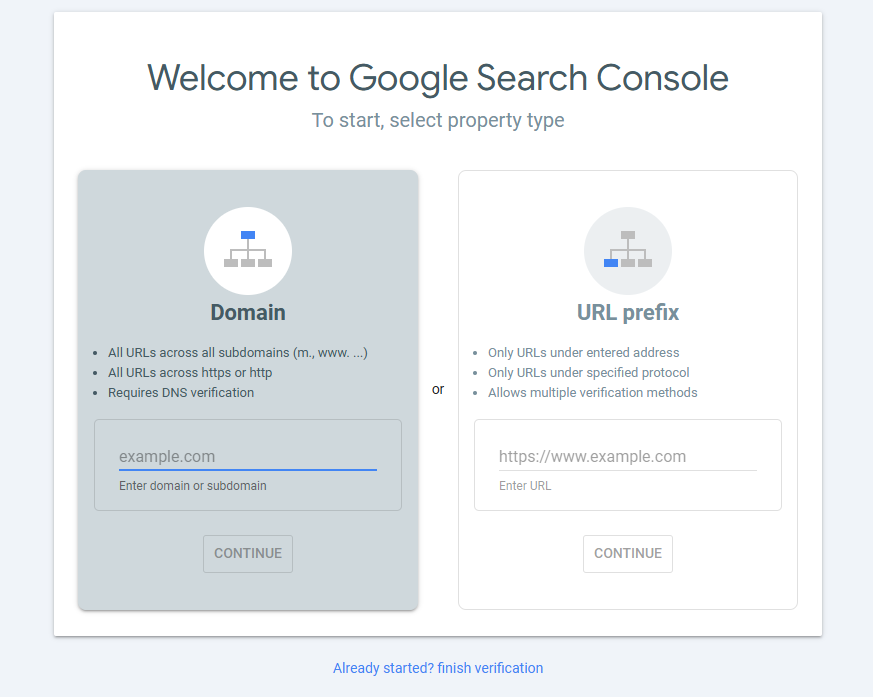
Forget third-party estimates for a second.
While tools like Ahrefs or Semrush estimate your traffic based on their own scrapers and clickstream data, GSC shows you what is actually happening in the SERPs (Search Engine Results Pages).
Moving Beyond the Web UI
The GSC web interface is fine for a quick check.
But for real SEO analytics, it’s too limited.
You only get 1,000 rows of data in the UI. That’s nothing for a site with thousands of pages. If you have a large e-commerce site or a content-heavy documentation portal, you are blind to 90% of your long-tail traffic data.
You need the API. Or better yet, the BigQuery Bulk Export.
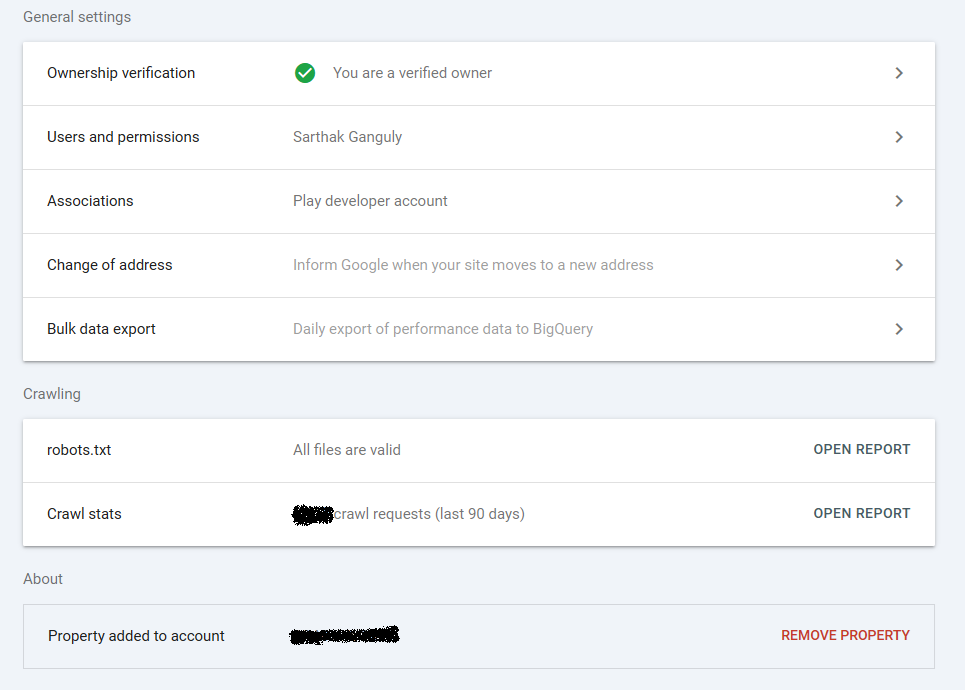
Enable the bulk export immediately. It pushes your daily performance data into BigQuery automatically. Once it’s there, you can run SQL queries to find “striking distance” keywords—pages ranking in positions 11-15 that just need a tiny push to reach the first page.
But why BigQuery? Because GSC only keeps data for 16 months.
If you want to compare year-over-year performance for a Black Friday campaign three years ago, the UI won’t help you. Data persistence is a technical requirement, not a luxury.
Debugging Indexation at Scale
Use the URL Inspection API. If you’re pushing a major site update or a migration, you can’t wait for Google to “eventually” find it. You need to verify that your new canonical tags and meta robots directives are being respected.
I use a Node.js script to loop through my sitemap and ping the Indexing API for high-priority pages. It forces Google to look at the content immediately. Note: The Indexing API is officially for Job Postings and Broadcast Events, but many SEOs find it works for other types of content too. Use it sparingly.
const {google} = require('googleapis');
const key = require('./service-account.json');

const jwtClient = new google.auth.JWT(
  key.client_email,
  null,
  key.private_key,
  ['https://www.googleapis.com/auth/indexing'],
  null
);

jwtClient.authorize(function(err, tokens) {
  if (err) {
    console.log(err);
    return;
  }
  let options = {
    url: 'https://indexing.googleapis.com/v3/urlNotifications:publish',
    method: 'POST',
    auth: { 'bearer': tokens.access_token },
    json: {
      'url': 'https://yourdomain.com/new-critical-page',
      'type': 'URL_UPDATED'
    }
  };
  // Execute request here...
});
This isn’t just about speed. It’s about feedback loops. The faster you get indexed, the faster you get data, and the faster you can iterate.
The Heavy Hitters: Ahrefs and Semrush
You can’t see the whole internet through GSC. You need to see what your competitors are doing. This is where Ahrefs and Semrush come in. These tools build their own “Link Graphs” by crawling the web, essentially mimicking how Google functions.
Ahrefs: The Link Graph King
Ahrefs has arguably the best backlink index in the industry. If you’re doing technical SEO tools research, you need their link data. Backlinks are still one of the top three ranking factors. If a site has 10,000 high-quality links and you have 10, you aren’t going to outrank them for a competitive term, no matter how fast your site loads.
I use their Site Explorer to audit our backlink profile. Specifically, I look for “broken backlinks.” These are 404 pages on your site that still have external sites linking to them. This is literally wasted authority.
It’s an easy win. Set up a 301 redirect from that 404 to a relevant live page. You just reclaimed lost link equity. No new content required. No outreach. Just server-side configuration.
Semrush: Keyword Intelligence and Competitive Gaps
Semrush excels at keyword gap analysis. You can plug in your domain and up to four competitors. It shows you exactly which keywords they rank for that you don’t.
Don’t just target high-volume keywords. That’s a trap. Look for “Keyword Difficulty” (KD). If you’re a new site, avoid anything with a KD over 50. Target the intersection of high volume and low KD. This is where the ROI lives.
Semrush also has a great “Position Tracking” tool. You can set it to track your rankings daily across different geographic locations and devices. Mobile rankings often differ significantly from desktop rankings due to varying intent and page speed constraints.
Technical SEO Tools for the Deep Dive
Sometimes you need to crawl your site like a bot does. Browser-based tools won’t cut it for a 50,000-page Single Page Application (SPA). You need tools that understand DOM execution.
Screaming Frog SEO Spider
This is the industry standard for a reason. It’s a desktop application, which feels a bit 2005, but it’s incredibly powerful. It handles JavaScript rendering (using an embedded Chromium instance) so you can see what your React, Vue, or Angular app actually looks like to a crawler.
Most SPAs fail at SEO because they don’t handle server-side rendering (SSR) or pre-rendering correctly. Screaming Frog will show you if your content is actually in the HTML or if it’s just a bunch of empty <div> tags that require JS to populate.
I use it to find:
- Duplicate H1 tags: Often caused by poorly componentized React templates.
- Non-canonical pages in the sitemap: This confuses Google’s indexer.
- Large images: Anything over 200KB slowing down your Largest Contentful Paint (LCP).
- Redirect Chains: A links to B links to C. Each hop loses a bit of “link juice” and increases latency.
Custom Python Crawlers with Scrapy
If Screaming Frog is too heavy or you need to automate a specific check across millions of URLs, write your own crawler. Python is the language of choice here.Scrapy is a high-level crawling and web scraping framework. You can build a middleware that checks for noindex tags or validates JSON-LD schema on the fly.
import scrapy
from scrapy.spiders import CrawlSpider, Rule
from scrapy.linkextractors import LinkExtractor

class MySeoSpider(CrawlSpider):
    name = 'seo_bot'
    allowed_domains = ['yourdomain.com']
    start_urls = ['https://yourdomain.com']

    rules = (
        Rule(LinkExtractor(), callback='parse_item', follow=True),
    )

    def parse_item(self, response):
        # Check for SEO hygiene
        return {
            'url': response.url,
            'status': response.status,
            'title': response.xpath('//title/text()').get(),
            'canonical': response.xpath('//link[@rel="canonical"]/@href').get(),
            'noindex': 'noindex' in response.xpath('//meta[@name="robots"]/@content').get_all(),
        }
This is lightweight and can be deployed as a Lambda function or a containerized job. It’s the ultimate technical SEO tool because it’s tailored specifically to your site’s architecture.
Building the SEO Analytics Pipeline
Collecting data is step one. Visualizing it is step two. Moving it from silos into a unified data warehouse is where the magic happens.
Why Looker Studio?
Google Looker Studio (formerly Data Studio) is free and connects natively to GSC and BigQuery. It’s great for stakeholders, but as a developer, you should use it for “Anomaly Detection.”
Don’t just build a “Total Clicks” chart. Build a “CTR by Position” chart.
If your average CTR for position 1 is 10%, but one specific page is only getting 2%, your title tag is failing. It isn’t an SEO problem; it’s a click-through rate problem. The data told you exactly where to look. You don’t need a “better” page; you need a “better” headline.
The BigQuery Advantage: Joining the Dots
Once your SEO analytics are in BigQuery, you can join them with other data sources. This is the holy grail of marketing engineering.
Imagine joining GSC data with your internal conversion data from your database. Now you aren’t just tracking “traffic.” You’re tracking “revenue per organic keyword.”
You might find that a keyword with only 100 clicks a month generates $5,000 in revenue, while a high-volume keyword with 10,000 clicks generates zero. That information changes your entire content strategy.
Core Web Vitals (CWV) and Performance
Google’s Page Experience update made performance a direct ranking factor. As a developer, this is your territory. You are the only one who can fix the LCP, FID (soon to be INP), and CLS.
Lighthouse CI: Preventative SEO
Don’t wait for a user to have a slow experience. Integrate Lighthouse into your CI/CD pipeline. Use the lighthouse-ci CLI tool.
If a pull request drops the performance score below a certain threshold (say, 90), fail the build. SEO is a shared responsibility. If a designer adds a 5MB hero image, the system should catch it before it hits production and nukes your rankings.
PageSpeed Insights API
For ongoing monitoring, use the PageSpeed Insights API. It provides “Crux” data—real-world field data from actual Chrome users over the last 28 days.
Lab data (Lighthouse) is a simulation. It’s run on a specific network speed and device. Field data is reality. It’s how real people on crappy 3G connections in the subway experience your site. Google uses field data for its rankings. You should too.
Automating the Audit Loop
Manual audits are where SEO goes to die. You do one big audit in January, fix three things, and then the site drifts back into disrepair by March.
Automation fixes this.
Set up a CRON job that runs a crawl weekly. Export the results to a CSV or a database table and use a script to compare it to last week’s crawl.
If the number of 404s jumped by 20% overnight, send a Slack alert to the engineering team.
Python for SEO Data Wrangling
I use the pandas library to handle large SEO datasets. It’s significantly faster and more reliable than Excel.
import pandas as pd

# Load last week's and this week's crawl results
old_crawl = pd.read_csv('crawl_jan_01.csv')
new_crawl = pd.read_csv('crawl_jan_08.csv')

# Find pages that were 200 OK but are now 404
broken_pages = new_crawl[(new_crawl['Status Code'] == 404) & (old_crawl['Status Code'] == 200)]

if not broken_pages.empty:
    print(f"Warning: {len(broken_pages)} new 404 errors detected!")
    # Trigger Slack hook or Email
This simple logic turns a reactive process into a proactive one. It ensures that SEO is maintained as part of the software development lifecycle (SDLC).
Advanced Search Intent Mapping
Keywords aren’t just strings. They represent a state of mind. Google’s algorithms are now incredibly good at determining what a user actually wants.
There are four main types of intent:
- Informational: The user wants to learn something. (“How to use GSC API”)
- Navigational: The user wants to go to a specific site. (“Ahrefs login”)
- Commercial: The user is researching products. (“Best SEO tools for developers”)
- Transactional: The user is ready to buy. (“Buy Semrush subscription”)
Your SEO tools will give you the volume. You have to provide the intent mapping.
Don’t try to rank a product page for an informational query. It won’t work. Google knows the user wants a guide or a tutorial, not a “Buy Now” button. If the top 10 results for a keyword are all blog posts, and you’re trying to rank a landing page, you’re fighting an uphill battle.
Competitive Intelligence: The “Content Gap” Strategy
Use Ahrefs or Semrush to find your competitor’s “Top Pages.”
Look for pages that have high traffic but thin content. Maybe it’s an old article from 2018 that’s out of date. This is a content gap. You can write a better, more comprehensive, and more technically accurate version of that page and “steal” the ranking.
It’s not enough to be good. You have to be better than the person currently in spot #1. That means better code examples, better diagrams, and faster load times.
Log File Analysis: The Final Frontier
Everything else we’ve discussed is an approximation based on external data or simulations. Log files are reality.
When a bot hits your server, it leaves a footprint in your access logs.
Analyze your logs to see:
- Crawl Frequency: How often does Googlebot visit? If it’s once a week, your content is stale. If it’s every 10 minutes, your site is high-priority.
- Crawl Budget Wastage: Is Googlebot wasting time on your /admin/ or /search/ pages?
- Orphan Pages: Pages that are being crawled but aren’t linked anywhere in your site’s navigation.
Tools like Logz.io, Splunk, or even a simple awk command can reveal why a page isn’t indexing.
# Get the most crawled URLs by Googlebot

grep "Googlebot" access.log | awk '{print $7}' | sort | uniq -c | sort -nr | head -n 20
This one-liner shows you exactly which URLs Googlebot is hitting most frequently. If your CSS and JS files are at the top of the list, ensure you have proper caching headers so Googlebot doesn’t have to fetch them every single time it visits.
The Strategy for 2024 and Beyond
SEO is moving away from “matching keywords” toward “matching entities.” Google understands the relationship between things.
If you write about “React,” Google knows it’s related to “JavaScript,” “Facebook,” and “Web Development.” Use SEO tools to identify these related entities (LSI keywords) and include them naturally in your content.
Schema Markup (JSON-LD) is your way of explicitly telling Google what your data means. Don’t just hope they figure out it’s a “Recipe” or an “Article.” Tell them.
{
  "@context": "https://schema.org",
  "@type": "TechArticle",
  "headline": "Mastering SEO Tools and Analytics",
  "author": {
    "@type": "Person",
    "name": "Senior Developer"
  },
  "keywords": "SEO tools, SEO analytics, technical SEO"
}
This structured data is a direct injection into Google’s Knowledge Graph. It increases your chances of getting “Rich Snippets” like star ratings or FAQ blocks in the search results.
Summary of the Technical Stack
You don’t need every tool on the market. You need a core set that works for your specific workflow.
- Google Search Console: Your primary performance monitor and source of truth.
- Ahrefs: For link building, competitor research, and backlink auditing.
- Semrush: For keyword research, gap analysis, and rank tracking.
- Screaming Frog: For deep technical audits and JS rendering checks.
- Python (Scrapy/Pandas): For custom automation and large-scale data analysis.
- BigQuery/Looker Studio: For building a permanent, scalable analytics pipeline.
Stop guessing. Start measuring. SEO is a game of incremental gains and data-driven decisions. The developer who uses the best SEO tools and builds the most efficient SEO analytics pipeline wins every time.
Go audit your site. Find those broken links. Automate those reports. Your rankings will thank you.
Ready to build?
The next step is implementation. Don’t just read this guide—pick one tool, connect the API, and find your first “striking distance” keyword today.
