
Technical SEO in 2026
Stop thinking about technical SEO as a simple checklist for search engines. By 2026, the game has shifted fundamentally. It is no longer just about making sure Google can crawl your pages.
Now, you are optimizing for a multi-agent environment where LLMs, headless browsers, and generative search engines dictate your visibility. If your page is messy, you are invisible.
You are essentially building a digital infrastructure that needs to be as readable to a machine as it is beautiful to a human.
Tweet
The architecture of your site is the foundation of this visibility. You cannot fix a broken structure with a few meta tags. We are moving into an era of machine-readability.
Your site must serve two masters: the human user who wants speed and the bot that needs structured data to understand your value.
☢ The “Great Crawl Wall” is real. Search engines are becoming more selective about what they index because the web is flooded with low-quality, AI-generated noise. To pass through that wall, your content must be impeccable.
In this guide, I will break down exactly how to build a site that survives the next decade. We will look at code, server-side logic, and architectural patterns that move the needle.
We are talking about architectural philosophy and the raw engineering required to dominate search results in a generative world.
Crawlability and Indexing
Site Architecture: The Hierarchy of Discovery
✌ I have covered some of this in a post specifically about on-page SEO. Do give this a read to complete this course.
Hierarchy is everything. If a user or a bot has to click more than three times to find your most important content, you have failed.
A flat hierarchy is the gold standard for 2026.
Why?
Because deep nesting dilutes link equity and makes it harder for discovery bots to map your site. When you bury a page five levels deep, you are telling Google that the page doesn’t matter.

Reference: Flat vs. Deep Website Hierarchies – NN/G
The 3-Click Rule and Flat Hierarchies
You want your homepage to be a gateway, not a maze. Every high-value page should sit just two or three levels deep. This ensures that the authority flowing from your backlinks reaches your internal pages quickly.
Flat does not mean a disorganized mess.
Use semantic silos. Group related content together logically.
If you run a tech blog, keep your “Python” tutorials under one branch and “DevOps” under another. This creates a topical cluster that search engines love. It also helps with “thematic relevance.” When a bot crawls one page in a silo, it discovers ten more related pages, reinforcing your expertise in that specific niche.
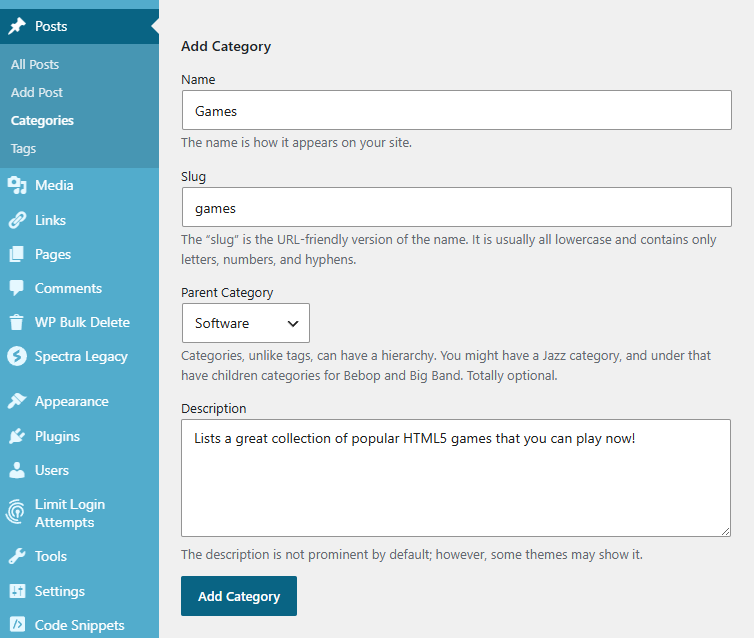
If you are using WordPress as your CMS, Categories and Tags are great examples to organize your content.
Categories are perfect when grouping similar content, like “Games”.
Tags are specific keywords that you wish to group. There is no hierarchy in tags at all.
Faceted Navigation and Crawl Traps
If you run an e-commerce site or a large directory, faceted navigation is your biggest enemy. Filters like “price,” “color,” and “size” can create millions of unique URLs that all show the same content. This is a classic crawl trap.
To fix this, you must be surgical.
Use noindex and robots.txt
Robots.txt is a directive for Search Engine bots to let them know which pages should be crawled.
No index instructs search engines to keep specific pages out of their index.
Implementing a noindex is really simple. This line in the <head> section of your page will do it.
<meta name="robots" content="noindex">For file downloads, add a X-Robots-Tag: noindex header in the server response.
☢ For noindex to work, the page or file must be excluded from robots.txt.
How to add noindex in WordPress?
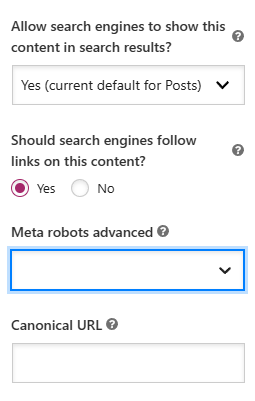
You have two good options.
Either go with Yoast or any other SEO plugin. Go to any page or post, select the Yoast sidebar – Advanced option and update the values.
Or if you wish to use a custom code instead of a plugin, try this below.
add_filter( 'wp_robots', 'custom_wordpress_noindex' );
function custom_wordpress_noindex( $robots ) {
    // Replace 42 with your specific page or post ID
    if ( is_page( 42 ) ) {
        $robots['noindex'] = true;
        $robots['nofollow'] = true; // Optional: prevents following links
    }
    return $robots;
}
How to use robots.txt
Use robots.txt to block the crawl of unimportant filter combinations. Or, better yet, use JavaScript to handle filtering so that the URL doesn’t change for low-value permutations. You want the bot to focus on your category pages and product pages, not on a filtered list of “blue shirts under $20” that only has two items.
✌ Use this robots.txt generator to create effective instructions to Search bots.
You can test robots.txt using Google’s own tool.
⚡Do this if you have experience or interest in Software Development or Testing
Step 1: Go to Google’s robot.txt library page on GitHub.
Step 2: Copy the repository URL from the Code section. In this case that would be https://github.com/google/robotstxt.git
Step 3: Ensure you have Git installed on your system. This is simple. If you are on Linux, Git should be pre-installed. Otherwise you can easily install it with sudo apt install git on Debian based distributions. It is similar for other distributions as well.
Step 4: It is best to build this with Bazel.
$ git clone https://github.com/google/robotstxt.git robotstxt
Cloning into 'robotstxt'...

$ cd robotstxt/bazel-robots

$ bazel test :robots_test
For a default clone, this should pass and output the result. Now you can build the main function.
bazel-robots$ bazel build :robots_mainStep 5: Now you can test your locally created robots.txt using the command below.
bazel-robots$ bazel run robots_main -- ~/local/path/to/robots.txt Your_Bot https://example.com/url
  user-agent 'Your_Bot' with URI 'https://example.com/url': ALLOWED
Now just put the robots.txt to the root of your website.
If you are using WordPress and using Yoast, you can go to Yoast – Tools – File Editor. Here you will get an option to add the robots.txt.
Use Canonicalisation
A canonical tag is a snippet that tells the search engines which page is the master copy.
Always mark the duplicate pages as canonical entries for the master pages.
Say you have a page www.example.com/topic. Say another page www.example.com/category/topic leads users to a similar content and you want the search results to ONLY have the former topic URL. Add a meta tag like this to the latter page.
<link rel="canonical" href="https://example.com/topic />
Add this to the <head> section of the page, and you should be set.
Breadcrumb JSON-LD: The Map for Bots
Breadcrumbs are not just for users. They are a massive signal for site architecture.
By using Schema.org breadcrumb markup, you tell search engines exactly where a page fits in your ecosystem. This markup appears in search results, improving your click-through rate (CTR) and giving the user a clear path back to your home page.
Check out this JSON-LD implementation:
{
  "@context": "https://schema.org",
  "@type": "BreadcrumbList",
  "itemListElement": [{
    "@type": "ListItem",
    "position": 1,
    "name": "Home",
    "item": "https://example.com/"
  },{
    "@type": "ListItem",
    "position": 2,
    "name": "Technical SEO",
    "item": "https://example.com/technical-seo/"
  },{
    "@type": "ListItem",
    "position": 3,
    "name": "2026 Blueprint",
    "item": "https://example.com/technical-seo/2026-blueprint/"
  }]
}
This code tells the bot: “This page belongs to the Technical SEO category.” It builds a relationship between entities.
Do not skip this. It is the easiest way to improve your site’s topical authority and help bots understand your internal hierarchy.
Use this site to create custom Breadcrumb markups.
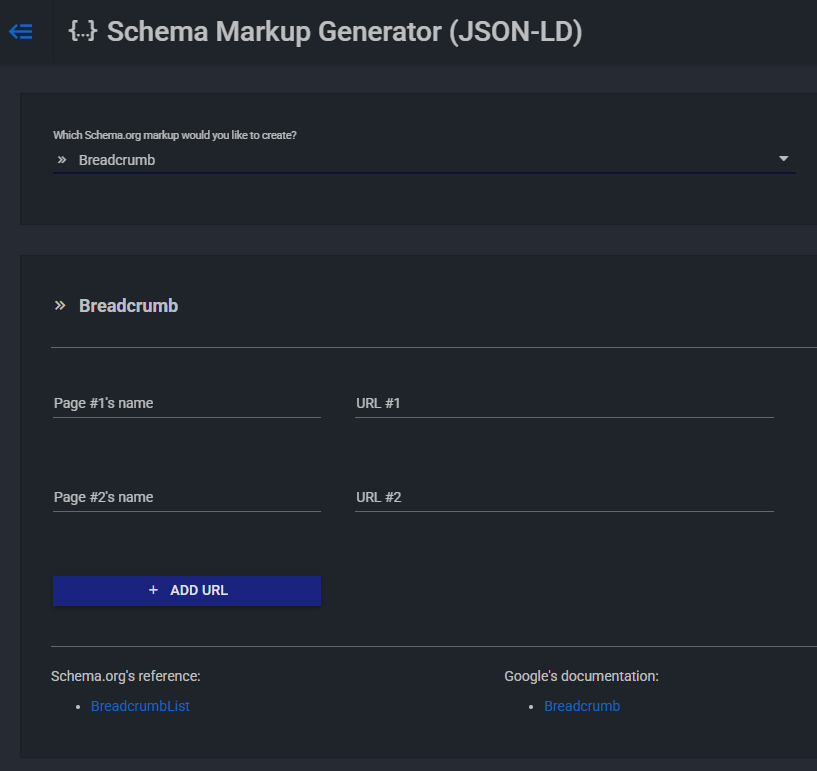
To auto add this schema while inserting breadcrumbs you can use Yoast or Rank Math.
Bot Governance: Managing the Multi-Agent Web
In 2026, you aren’t just dealing with Googlebot. You have GPT-bot, CCBot, and a dozen other AI scrapers hitting your server. These bots aren’t just looking to index you; they are looking to consume your data to train their models. You need a strategy for bot governance that balances visibility with data protection.
Tiered Access and llms.txt
Standard robots.txt rules still apply, but they are no longer enough. You need to decide who gets your data. Do you want AI companies training their models on your proprietary content for free? Probably not. But you still want to show up in ChatGPT’s “Search” feature or Google’s Gemini results.
Enter the llms.txt file. This is a new standard for defining how LLMs interact with your content. It sits in your root directory, much like robots.txt. It allows you to set specific rules for AI agents that differ from standard search crawlers.
# llms.txt
# This file provides instructions for LLM crawlers.
User-agent: GPTBot
Disallow: /premium-content/
Allow: /public-guides/
User-agent: *
Disallow: /internal-data/
# Specific instructions for AI agents
Max-context-window: 16k
Preferred-format: markdownBy explicitly stating what AI bots can and cannot do, you protect your crawl budget for the bots that actually send you traffic. You are also signaling to these bots how they should ingest your data. If you prefer they read your Markdown files instead of your bloated HTML, tell them.
High-Hygiene XML Sitemaps
Your XML sitemap should only contain “clean” URLs. In 2026, Google is very sensitive to “sitemap noise.” If you include URLs that shouldn’t be indexed, Google will eventually ignore your sitemap entirely.
A high-hygiene sitemap means:
- Zero 404s: Never include a broken link.
- Zero 301s: Only include the final destination URL.
- Canonical URLs only: If you have multiple versions of a page, only include the one you want to rank.
- No “noindexed” pages: If you told bots not to index it, don’t put it in the map.
If you have a massive site, use a Sitemap Index. Break your sitemaps down by category (e.g., sitemap-products.xml, sitemap-blog.xml). This makes it easier to track indexing issues in Google Search Console. You can quickly see if your “Blog” section is being indexed while your “Product” section is lagging.
Crawl Budget Optimization: The Art of Saying No
Crawl budget is the amount of time and resources a bot spends on your site. Don’t waste it on junk. Use robots.txt to block search engines from crawling your /admin/ folders, your /search/ results pages, and any dynamic URL parameters that create duplicate content.
But there is a more advanced layer to this.
Speed up the process.
A fast server response means a bot can crawl more pages in the same amount of time.
If your server takes 2 seconds to respond, you are burning your budget. If you have 10,000 pages and a slow server, Google might only crawl 100 pages a day. At that rate, it will take 100 days to see your updates. That is unacceptable in a real-time world.
Internationalization: Hreflang and Global Discovery
If you serve a global audience, you need to master hreflang. It tells search engines which version of a page to show to users in different regions.
Common Pitfalls
The biggest mistake is missing “return tags.” If Page A links to Page B as the French version, Page B MUST link back to Page A as the English version. If this reciprocal link is missing, Google will ignore the tags.
Another common issue is using the wrong codes. Use ISO 639-1 for languages and ISO 3166-1 Alpha-2 for regions. And always include an x-default tag for users whose language/region doesn’t match any of your specified versions.
<link rel="alternate" href="https://example.com/en/" hreflang="en" />
<link rel="alternate" href="https://example.com/fr/" hreflang="fr" />
<link rel="alternate" href="https://example.com/" hreflang="x-default" />
The Rendering Strategy Debate: SSR vs SSG vs ISR
Choosing how you render your content is a massive SEO decision. It isn’t just about developer experience; it’s about how quickly a bot can see your meaningful content.
Static Site Generation (SSG)
SSG is the gold standard for performance. You build the HTML at build time and serve it via CDN. It’s incredibly fast. Googlebot loves it because there is no JavaScript to execute to see the content. But it’s hard to scale if you have 100,000 pages that change frequently.
Rebuilding the whole site every time you fix a typo is a nightmare.
There are some Static Site Generators that make this a lot easier.
I have covered some of my favorite Static Site Generators here.
Server-Side Rendering (SSR)
SSR generates the HTML on every request. It’s better for dynamic data, but it puts a load on your server. If your server is slow, your TTFB (Time to First Byte) suffers, and so does your ranking.
You have to optimize your database queries and use heavy caching to make SSR work for SEO at scale.
There is no need to reinvent the wheel here. Most CMS already have caching options in built or easily configurable via plugins.
LiteSpeed Cache will do pretty much everything for nearly free on WordPress. Just install the LiteSpeed Cache plugin and much of the default options are perfect to get started.
Incremental Static Regeneration (ISR)
ISR is the middle ground. It allows you to update static pages after you’ve built your site. You can regenerate a single page in the background as requests come in. This gives you the speed of SSG with the flexibility of SSR. For large content sites, this is often the best choice for 2026.
Mobile SEO: Mobile-Only Indexing in Practice
Mobile-first indexing is a thing of the past. We are now in mobile-only indexing. Google essentially ignores the desktop version of your site when determining rankings. If it isn’t on the mobile version, it doesn’t exist for SEO purposes.
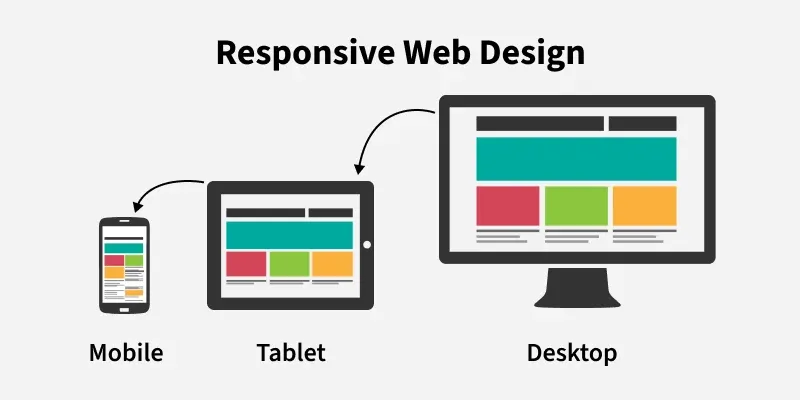
Source: Responsive Web Design – GeeksforGeeks
Responsive Web Design vs. Adaptive Delivery
Responsive Web Design (RWD) is the undisputed king. It uses the same HTML for all devices, which prevents “content parity” issues. If you hide content on mobile to “save space,” you are hurting your SEO. Google will not see that hidden content, and you will not rank for it.
However, in 2026, we are seeing a move toward Adaptive Delivery using Edge computing. This is where the server detects the device and sends a highly optimized version of the HTML. This is NOT the same as a separate “m.” site. It is the same URL, but the code is pruned for mobile performance. For example, you might strip out heavy desktop-only JS libraries before the page even leaves the CDN.
Content Parity and the Mobile Gap
Check your mobile site. Does it have the same headlines? The same structured data? The same internal links? If the answer is no, you have a parity problem. Many developers use “hidden” menus on mobile that don’t actually exist in the DOM until a user clicks. This can be a problem if the bot can’t “click.” Ensure your most important links are always available to the crawler, even if they are styled differently on mobile.
5G and the Rendering Pipeline
With the global adoption of 5G, expectations for mobile speed have skyrocketed. Users expect instant loads. This means you need to optimize your rendering pipeline. Use content-visibility: auto to skip rendering of off-screen elements. Use contain-intrinsic-size to prevent layout shifts when those elements finally do load. This saves CPU cycles on the mobile device, making the site feel “snappy.”
The Performance Layer: Beyond Core Web Vitals
Speed is not just a “nice to have.” It is a technical requirement. In 2026, we will focus on Core Experience Metrics 2.0, specifically INP (Interaction to Next Paint) and LCP (Largest Contentful Paint). The standard has moved from “Is it fast?” to “Does it feel fast to use?”
Optimizing for INP (Interaction to Next Paint)
INP replaced First Input Delay as the primary metric for responsiveness. It measures how long it takes for a page to react to a user interaction, like a click or a keypress. This is a holistic metric that looks at the entire lifecycle of the interaction.
To fix INP:
- Break up long tasks. If you have a JavaScript function that takes 500ms to run, the browser cannot respond to a click until that task is done. Use setTimeout or requestIdleCallback to yield the main thread.
- Avoid “Layout Thrashing.” This happens when you read and write to the DOM repeatedly in a single frame. The browser has to recalculate the layout every time, which is incredibly expensive.
- Minimize main thread work. Every kilobyte of JS you ship has to be parsed and executed. Use less code. Switch to vanilla JS where possible and ditch the heavy frameworks if you don’t actually need them.
LCP and Fetch Priority
LCP (Largest Contentful Paint) is about perceived loading speed. Usually, this is your hero image or the main H1. You want this to appear in under 1.5 seconds on a 4G connection.
Use the fetchpriority attribute to tell the browser: “Download this image immediately!” This attribute is a game-changer. It bypasses the browser’s default heuristic and puts your hero image at the top of the network queue.
<img src="hero-image.avif" fetchpriority="high" alt="Technical SEO Blueprint">Also, switch to AVIF. It offers better compression than WebP and much better than JPEG. You can save 30-50% on file size without losing quality. If you aren’t using AVIF in 2026, you are essentially serving legacy media.
Edge SEO and Cloudflare Workers
Why wait for a request to hit your origin server?
Use Edge SEO. With Cloudflare Workers or Vercel Edge Functions, you can inject meta tags, fix redirects, and even modify HTML before it ever reaches the user’s browser.
This is incredibly powerful for legacy systems where you cannot easily change the source code. For example, if your CMS doesn’t support breadcrumb schema, you can run a script at the edge to inject it. This happens at the network level, so there is zero performance penalty for the user. In fact, it’s often faster than doing it on the origin.
// A simple Cloudflare Worker to inject a canonical tag and fix a title
addEventListener('fetch', event => {
  event.respondWith(handleRequest(event.request))
})
async function handleRequest(request) {
  const response = await fetch(request)
  const contentType = response.headers.get('content-type')
  if (contentType && contentType.includes('text/html')) {
    let html = await response.text()
    // Inject canonical and fix title
    html = html.replace('</head>', '<link rel="canonical" href="https://example.com/current-page" /></head>')
    html = html.replace('<title>Old Title</title>', '<title>New SEO-Optimized Title</title>')
    return new Response(html, {
      headers: response.headers
    })
  }
  return response
}
JavaScript SEO: Solving the Hydration Problem
Modern frameworks like React and Next.js are great for developers, but they can be a nightmare for SEO if not handled correctly. The biggest issue is Hydration. This is the process where the static HTML sent from the server becomes interactive in the browser.
The “Empty Shell” Problem
If your server sends an empty div and waits for JavaScript to fetch the content on the client side, you are in trouble. While Google can render JavaScript, it’s a two-stage process. First, it crawls the HTML. Then, when resources are available, it renders the JS. This delay can mean your content isn’t indexed for days or weeks.
Always use Server-Side Rendering (SSR) or Pre-rendering for your content. The HTML should contain all the text and links when it leaves the server. JavaScript should only be for interactivity, not for content delivery.
Total Blocking Time (TBT)
TBT measures the total amount of time between First Contentful Paint (FCP) and Time to Interactive (TTI) where the main thread was blocked long enough to prevent input responsiveness. High TBT usually means you are shipping too much JS.
Code-splitting is your friend. Don’t send the entire library for one page. Use dynamic imports to only load the components you need for the current view.
Log File Analysis: The Developer’s Secret Weapon
If you want to know what bots are actually doing, stop looking at Search Console. Look at your server logs. Log file analysis is the only way to see the raw data of bot behavior.
What to Look For
You want to see how often Googlebot is hitting your site, which pages it’s ignoring, and where it’s getting stuck. Look for:
- Crawl Frequency: Are your important pages being crawled daily?
- Response Codes: Are bots hitting 404s or 500s that you didn’t know existed?
- Wasteful Crawling: Is Googlebot spending 50% of its time on your /search/ pages?
A Simple Grep for Logs
You can use basic shell commands to analyze your Nginx or Apache logs. For example, to see the top 20 pages crawled by Googlebot, run:
grep "Googlebot" access.log | awk '{print $7}' | sort | uniq -c | sort -nr | head -n 20This command filters for Googlebot, extracts the URL, counts the occurrences, and shows you the top 20. It’s a quick way to see if your “silo” strategy is actually working. If Googlebot is spending all its time on your “About” page instead of your product pages, you have an internal linking problem.
AI-Ready Infrastructure: Generative Engine Optimization (GEO)
Search engines are becoming answer engines. This is Generative Engine Optimization (GEO). To show up in an AI’s response, you need to provide structured, entity-based data. It is no longer enough to “rank for keywords.” You must “be the entity” that the AI trusts.
Semantic HTML and the DOM
Stop using <div> for everything. Use semantic tags like <article>, <section>, <aside>, and <footer>. These tags give bots context. They tell the machine: “This is the main content,” and “This is the navigation.”
LLMs use the DOM structure to understand the hierarchy of information on a page. If your page is a flat mess of <div> tags, the LLM has to work harder to understand it. If you use a clean, semantic structure, the LLM can easily extract the key facts and insights. This increases the chances of your content being used as a source in an AI-generated answer.
Advanced Schema.org Markup
Schema.org markup goes beyond the basics. Use About and Mentions properties in your Article schema to link to other entities. This is how you build a “Knowledge Graph” around your content.
If you are writing about technical SEO, your schema should link to the Wikipedia entry for Search Engine Optimization or the official documentation for Googlebot. This creates an “Entity-Relationship” map that LLMs can easily parse. It tells the AI: “This article is about Topic A, which is related to Entity B and Entity C.”
{
  "@context": "https://schema.org",
  "@type": "TechArticle",
  "headline": "Technical SEO: The 2026 Blueprint",
  "author": {
    "@type": "Person",
    "name": "Senior Developer",
    "jobTitle": "Technical Architect"
  },
  "about": [
    {
      "@type": "Thing",
      "name": "Search Engine Optimization",
      "sameAs": "https://en.wikipedia.org/wiki/Search_engine_optimization"
    }
  ],
  "mentions": [
    {
      "@type": "SoftwareApplication",
      "name": "Google Search Console",
      "sameAs": "https://search.google.com/search-console/about"
    }
  ]
}
Information Retrieval vs. Generative Search
Understand the difference. Traditional search is about “Information Retrieval”—finding the most relevant link. Generative search is about “Synthesis”—creating an answer from multiple sources. To be the source of that synthesis, your data must be authoritative and easy to parse.
This means using clear headers (H2s and H3s) that ask and answer specific questions. Instead of a header that says “Performance,” use a header that says “How to Optimize for INP in 2026.” This matches the “natural language” queries that users are typing into AI search bars.
The Role of Fact Density
LLMs prefer “high fact density.” This means providing specific data points, statistics, and concrete examples. Avoid fluff. Instead of saying “Our site is very fast,” say “Our site achieves an LCP of 1.2 seconds and an INP of 40ms.” This specific data is “sticky” for AI models. It gives them something concrete to reference.
Security and Content Integrity
Security is now a technical SEO factor. If your site is compromised, you will be de-indexed faster than you can say “malware.” But you also need to protect your site from “aggressive” bots that might scrape your content and outrank you with your own data.
HTTPS and TLS 1.3
This is the baseline. If you aren’t on HTTPS, you aren’t in the game. But you should also be on TLS 1.3, which is faster and more secure than its predecessors. It reduces the handshake time, making your initial connection faster.
Rate Limiting and WAF (Web Application Firewall)
Use a WAF to block malicious bots. But be careful. If your WAF is too aggressive, it might block legitimate search crawlers. Use “Bot Management” tools from providers like Cloudflare or Akamai. These tools use machine learning to distinguish between a helpful Googlebot and a harmful scraper.
Content Integrity and Digital Signatures
As AI-generated content becomes more common, “Content Integrity” will become a ranking signal. In the future, we may see the use of digital signatures (like C2PA) to prove that an article was written by a human or a verified source. While this isn’t a major signal in 2026 yet, the technical infrastructure is being built. Staying ahead of this curve by maintaining a strong “Author” entity in your Schema is a smart move.
Moving Forward: The Continuous Audit
Technical SEO is not a “one and done” project. It is a moving target. What worked in 2020 is a liability in 2026. You have to be proactive. You need to be running continuous audits.
Set up automated monitoring for your experience metrics. Use tools that alert you the moment your LCP spikes or your sitemap starts returning errors. In a world where search engines update their algorithms weekly, you cannot afford to wait for your monthly manual audit to find a problem.
The web is getting faster, smarter, and more complex. Your site needs to keep up. Start with your architecture—it’s the skeleton of your site. Nail your performance metrics—they are the muscles. And make sure you are speaking the language of the machines with structured data—that’s the voice of your site.
If you want to stay ahead, keep testing. Don’t take “best practices” as gospel.
Test them on your own infrastructure. Look at your logs. See how bots are actually behaving on your site. The data doesn’t lie.
Ready to audit your site?
Use the strategies I’ve outlined here to build a more resilient, machine-ready web presence. Let’s get to work and build a web that is faster and more accessible for everyone—human and machine alike.
